AI vs Canva: Which Is Faster for Marketing Materials?
Canva takes 30+ minutes per flyer. AI-first tools finish in 30 seconds. Honest comparison of speed, quality, and batch generation for business documents.
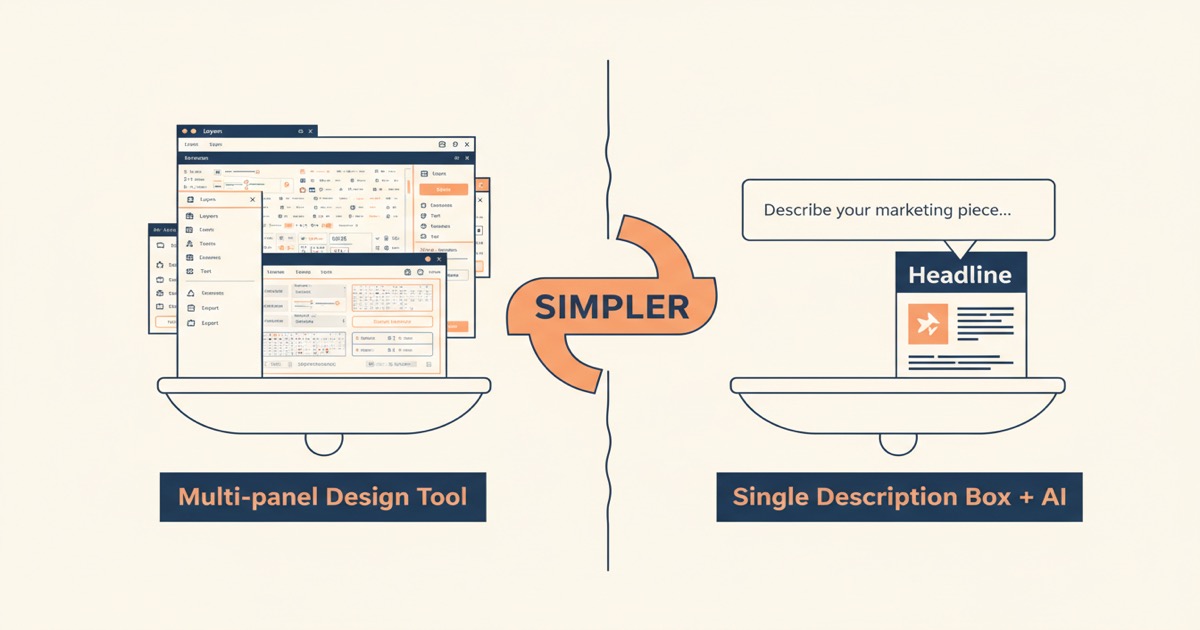
Most people don't need pixel-perfect design control. They need a flyer by Thursday.
I've used Canva for years. It's a genuinely impressive tool. But every time I open it to make a simple marketing flyer, I end up spending 30 minutes dragging boxes around, swapping fonts, and second-guessing my color choices. According to Canva, over 200 million people use Canva monthly, which tells you the demand for design tools is real. What it doesn't tell you is how much time those 200 million people spend inside the editor before they get something they're happy with.
I built an AI document tool because I kept asking myself the same question: why am I designing this? I know what I want. I just need someone (or something) to make it.
Key Takeaways
- Canva averages 30-60 minutes per marketing asset; AI-first tools can finish in under 60 seconds
- Canva excels at pixel-level design control and has 250+ million templates (Canva, 2024)
- AI-first creation removes the design skill requirement entirely
- For data-driven bulk documents — invoices, certificates, badges — with built-in delivery, a document-automation tool fits the job better than a design editor
How long does it actually take to create a flyer in Canva?
A 2023 survey by Venngage found that 36% of marketers spend 2-5 hours per week creating visual content. That time adds up. To test the real-world difference, I timed myself creating the same marketing flyer in both Canva and with AI.
The flyer was simple: a spring sale promotion for a fictional bakery. 20% off, dates, location, a tagline. Nothing complex.
The Canva workflow
Here's what actually happened when I opened Canva:
- Search "sale flyer" in templates. Scroll through dozens of results.
- Pick one that's close to what I want. It's never exactly right.
- Change the headline text, font size, and color.
- Swap the background image. Search Canva's library, try three options.
- Adjust the layout because the new image doesn't fit the old text placement.
- Tweak the secondary text. Realize the font pairing looks off. Try two more.
- Move elements around until the alignment feels right.
- Export as PDF.
Total time: 34 minutes. And I know my way around Canva. Someone less experienced would take longer.
The AI workflow
Here's the same flyer with an AI-first approach:
- Type: "A spring sale flyer for Sweet Maple Bakery. 20% off all pastries April 18-25. Located at 412 Oak Street. Warm, inviting design with pastel colors."
- Wait about 30 seconds.
- Download the PDF.
Total time: 45 seconds. That includes typing the description.
I've now created over 200 documents this way. The speed difference isn't a marketing number. It's what I experience every single day when I need a quick asset.
What does Canva do better?
Canva is a better tool for certain jobs, and I want to be honest about that. According to Canva's 2024 annual report, their platform hosts over 250 million templates and supports real-time team collaboration. That's a massive library nobody else matches.
Pixel-level control
If you need to place a logo exactly 24 pixels from the top-left corner, Canva lets you do that. AI tools give you a finished design, but you don't get to nudge individual elements pixel by pixel. For brand-strict organizations with detailed style guides, that control matters.
Team collaboration
Canva's real-time editing is excellent for teams. Multiple people can work on the same design simultaneously. If your workflow involves a designer creating an asset and a manager approving it inside the same tool, Canva handles that well.
Massive template variety
250 million templates means you'll probably find something close to what you need. Need a vertical Instagram story for a pet grooming salon? There's a template for that. Canva's library covers niche use cases that AI tools haven't been trained on yet.
But here's the question worth asking: do you actually need all of that?
When is AI faster than Canva for marketing materials?
For 80% of business document needs, speed matters more than pixel control. A HubSpot survey found that 50% of marketers consider visual content "very important" to their strategy, yet time remains the biggest barrier to producing it consistently.
You win with AI when:
You're not a designer. Most people creating business documents aren't trained in design. They're office managers, freelancers, teachers, small business owners. Dragging elements around an editor isn't their strength. Describing what they need in plain English is.
You need it fast. A client asks for a proposal by end of day. Your boss needs a flyer for tomorrow's event. You don't have 30 minutes. You have 5.
Good enough is good enough. Not every flyer needs to be award-winning. Sometimes you just need something professional and clean. Quickly.
You're creating multiple variations. Need the same flyer in three color schemes? Or five versions for five different locations? In Canva, that's five editing sessions. With AI, it's five slightly different descriptions.
You stick with Canva when:
- Brand guidelines require exact color codes, spacing, and element placement
- Your team collaborates live on designs
- You need to reuse and iterate on a single design over months
- The design itself is the product (not just a vehicle for information)
Can Canva handle batch document generation?
Partly — and this is where the tools genuinely differ. Canva's Bulk Create can take a spreadsheet and generate design variants, so for something like 200 event flyers with different names it does more than it used to. Where a design editor is a weaker fit is data-driven document automation: generating invoices, certificates, or personalized letters at volume and then delivering them. According to Statista, there are over 33 million small businesses in the US alone, and many generate exactly these documents in bulk.
Bulk Create is built around design templates inside the editor. A document-automation approach starts from the data instead: upload a spreadsheet with 200 rows and generate all 200 personalized PDFs — then email each one to its recipient, or trigger the whole job from your CRM through an API. I've watched users do this for event badges, certificates of completion, and personalized invoices. One upload, one click, 200 documents, delivered.
The difference is the starting point: Canva starts from a design template; a document tool starts from your data and your document type. For invoices and certificates at volume, that data-first architecture fits better.
What does an AI-first workflow actually look like?
The real difference isn't about features, it's about the starting point. Canva starts with a blank canvas. AI starts with your intent. A McKinsey report estimated that generative AI could automate 60-70% of current work activities, and document creation is one of the clearest examples.
Here's a side-by-side comparison of the full workflow:
| Step | Canva | AI-First |
|---|---|---|
| Start | Browse 250M+ templates | Type a description |
| Customize text | Click each text box, edit | Already included in your description |
| Adjust layout | Drag, resize, align manually | Handled automatically |
| Choose colors/fonts | Pick from palettes, test combinations | Inferred from your description or brand URL |
| Add branding | Upload logo, position manually | Paste your website URL, branding pulled automatically |
| Export | Choose format, download | One-click PDF download |
| Total time | 25-45 minutes | 30-60 seconds |
| Skill required | Basic design sense | Can type a sentence |
The AI approach trades control for speed. You don't get to nudge every element, but you also don't need to. For a business flyer, a sales proposal, or an event invitation, the AI output is often better than what most non-designers would produce in Canva anyway.
The real competitor to Canva isn't a better design tool. It's removing the need to design at all. Most business documents are information delivery, not art. The faster that information gets into a professional format, the better.
FAQ
Is AI-generated design quality as good as Canva?
For business documents like flyers, invoices, proposals, and certificates, AI output is comparable to what a non-designer would produce in Canva. Professional designers will get better results from Canva's manual controls. But for the 80% of users who aren't designers, AI-generated documents are often more polished because the AI handles typography, spacing, and color theory automatically.
Can I edit an AI-generated document after creation?
It depends on the tool. Some AI generators produce a final PDF with no editing step. Others let you refine with follow-up instructions like "make the headline larger" or "change the color scheme to blue." You won't get Canva's drag-and-drop editor, but natural language refinement can handle most adjustments.
How much does an AI Canva alternative cost?
AI document tools typically range from $15-30 per month for individual plans. Canva Pro costs around $15 per month (Canva; verify current pricing). The price difference is small, but the time savings are significant. If your time is worth $50/hour and you save 30 minutes per document, you break even after creating one asset per month.
Does Canva have any AI features?
Yes. Canva added Magic Design, AI image generation, and text-to-template features. These are useful additions, but they still operate within Canva's editor-first workflow. You're still inside the editor arranging elements. AI-first tools skip the editor entirely.
What marketing materials work best with AI?
Flyers, brochures, event invitations, proposals, one-pagers, social media graphics, certificates, and invoices all work well. Anything where the content matters more than the exact visual arrangement is a strong candidate. Multi-page documents with complex layouts, like magazines or annual reports, still benefit from manual design tools.
The honest answer
Canva is an excellent product. I still use it for projects where I want fine-grained design control or when I'm collaborating with someone in real time. It deserves its 200 million users.
But most of the documents I create for my business don't need an editor. They need to exist. I need a flyer for an event. I need an invoice for a client. I need 50 certificates for a workshop. The less time between "I need this" and "it's done," the better.
If you're spending 30 minutes making documents that should take 30 seconds, it's worth trying a different approach. Create a free account and see how fast you can go. Type a description. Get a PDF. Decide for yourself.
- Jason