How My Wife Refreshed a 3-Year-Old Handout in Under a Minute
A real story: a parent-resource handout from three years ago, redesigned by AI in under a minute. Every hyperlink preserved, every word intact, magazine-grade design.
My wife had a presentation coming up — not a new one. One she's been giving for years to rooms full of parents who need real, practical resources. Books, articles, dating apps, video series. The kind of handout people actually fold up and take home.
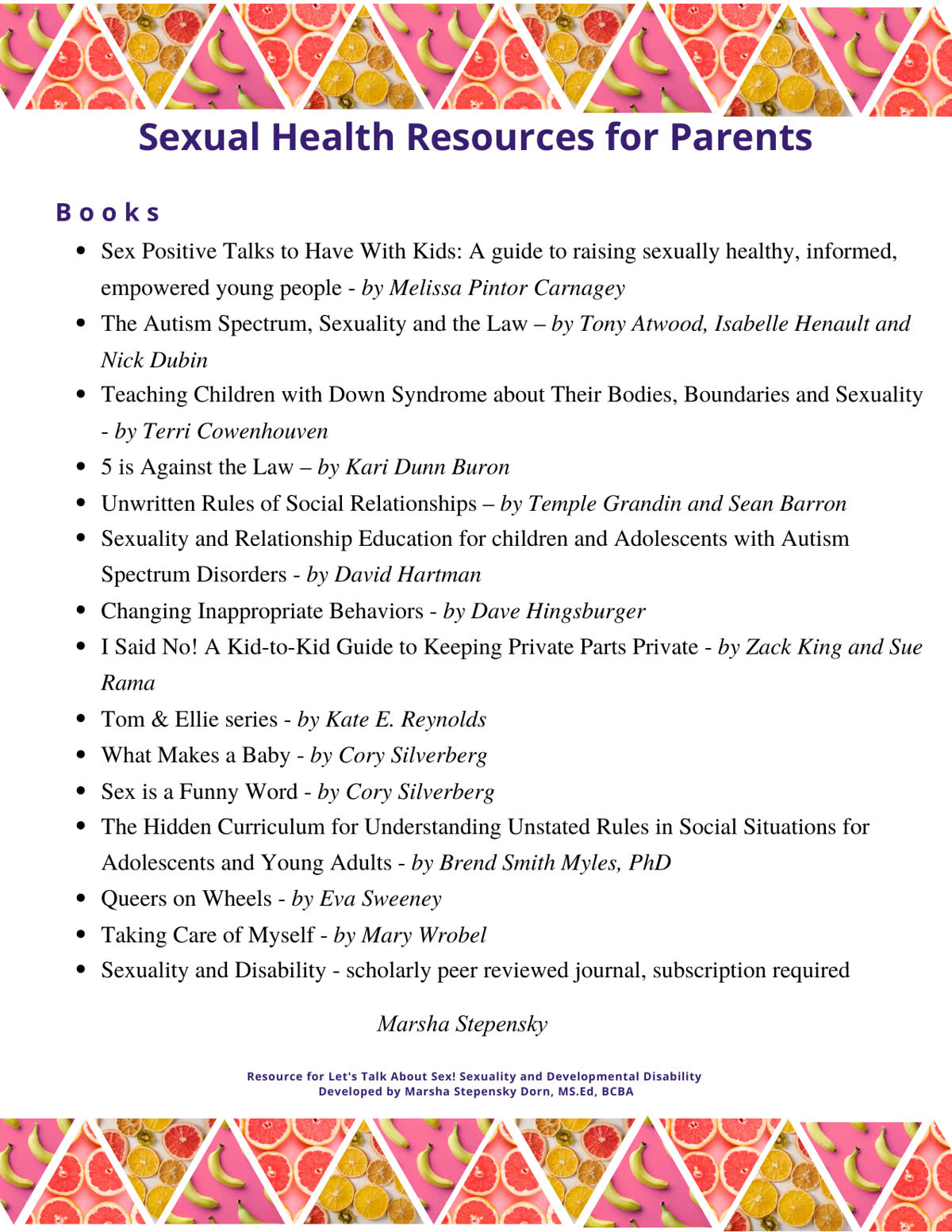
The content still held up. Every link worked. Every recommendation was still relevant. The design, though, was clearly from another time. It looked exactly like what it was: something built in Canva three years ago and exported as a PDF. Photo-collage banners, a heavy purple title, bright blue underlined links. Nothing technically wrong with it — just dated.
She didn't want to rebuild it. She didn't want to spend her Sunday reformatting fifteen book entries and fixing spacing issues. She just wanted the same document, refreshed.
So I told her to drop it into EZdoc.
Before
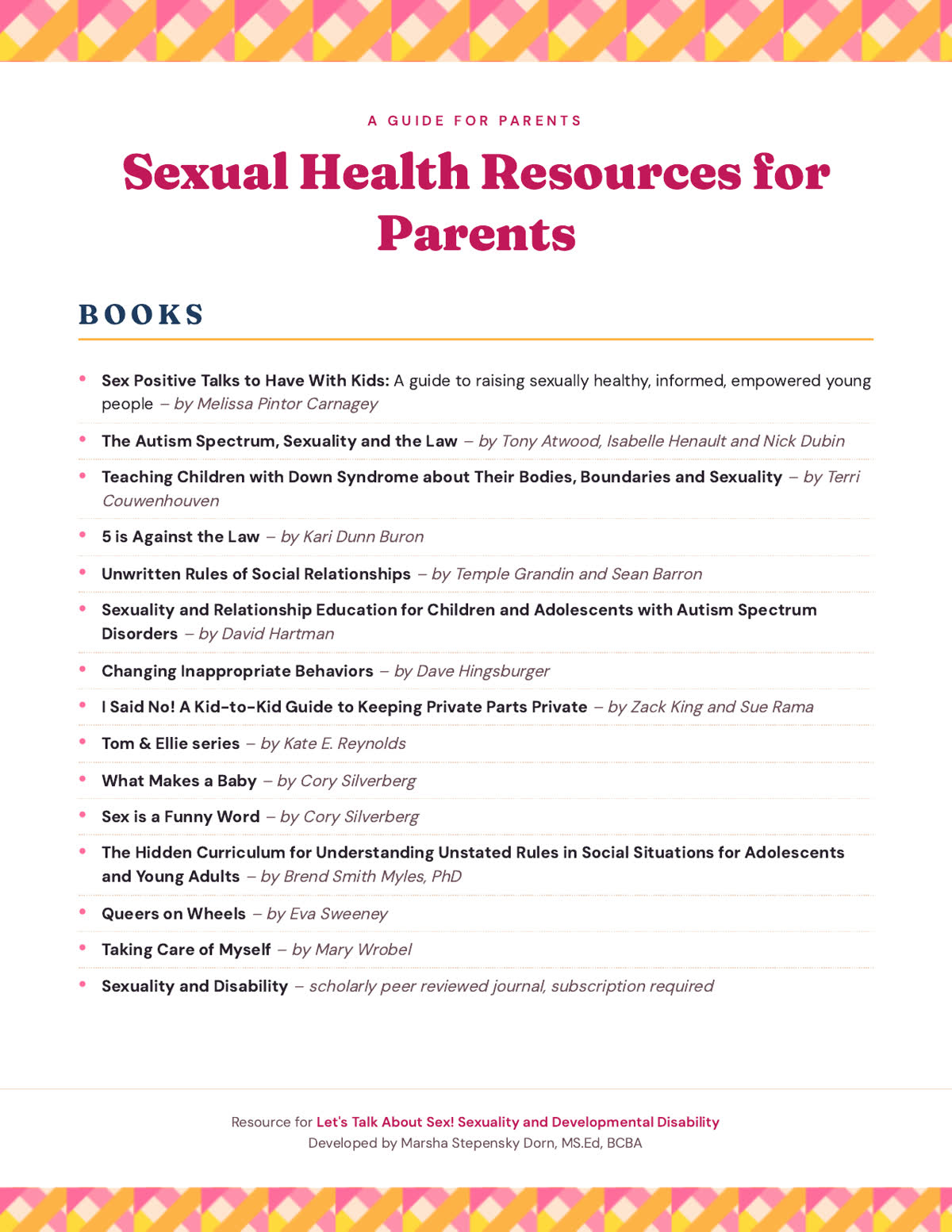
After (EZdoc AI)
Key Takeaways
- Upload an existing PDF, ask for a refresh, get a redesigned version in about a minute
- Every hyperlink, every word, every section is preserved exactly — only the design changes
- The result feels like a magazine, not a 2020 PowerPoint export
- Free tier covers 3 AI generations; paid plans start at $19/mo
The ask
She uploaded the PDF and typed one sentence: Make it look beautiful — keep everything exactly the same. No design brief. No examples. No back-and-forth.
What came back
About a minute later, she had a redesigned version that felt professional, sleek, and warm. The structure was identical, but the presentation was dramatically better. The photo banners became clean geometric shapes in the same warm palette. The title looked like it belonged in a magazine. Sections had clear hierarchy and spacing. Even the links were styled in a way that felt intentional instead of default.
What stood out most was that nothing about the content had changed. Every link still worked, every item was in the same order, and every section was intact.
This wasn't just any handout. In addition to her day job, my wife leads workshops for parents and caregivers of autistic and developmentally disabled kids and adults. She works with families navigating conversations about bodies, boundaries, and consent. It's not an ordinary handout. It needs to be accurate and current. It also needs to feel professional and approachable. It has to be something people trust enough to actually use.
The content handled the first part. The redesign fixed the second.
What changed (and what didn't)
She didn't rewrite anything. She didn't rethink the structure or start from scratch. The work itself stayed exactly the same. What changed was how it showed up.
How it works
Three steps. None of them require knowing anything about design.
Step 1: Upload the document. Drag a PDF, image, or HTML file into the dropzone. The AI scans the layout, the structure, the text, and every hyperlink baked into the file's metadata.
Step 2: Describe what you want changed. Or don't. "Make it beautiful" is a complete instruction. So is "switch everything to navy." So is "modernize this and add our logo top-left." Be specific or vague — both work.
Step 3: Download. A polished, print-ready PDF in about a minute. Every link still clickable. Every word preserved. New design.
If the first pass isn't quite right, hit "Tweak with AI" and refine in plain English: "Make the headers bigger." "Switch to a serif." "Move the footer up — it's overlapping the content." The AI re-runs with that note in mind. As many rounds as you need.
Who this is for
If you have a document sitting in a folder that still works but looks outdated — a handout you reuse, a flyer, a one-pager, a resume — this is a surprisingly easy way to bring it back to life without starting over.
Drop it in. Ask for a refresh. Keep what works.
The hardest part of redesigning an existing document isn't the design. It's deciding to start. Once you've started, an AI redesign is faster than opening Canva.
Try the AI editor — free tier includes three generations. No credit card.
For a fresh deck rather than a refresh, browse free editable PowerPoint presentation templates.
Have a document you'd love to update but never get around to? Send it through. The first one is on the house.