165 Professional Document Templates - Free to Preview, Ready to Use
165 free document templates across 13 categories. 6 color themes, 3 fonts, smart placeholders. Preview with real data, generate PDFs instantly.
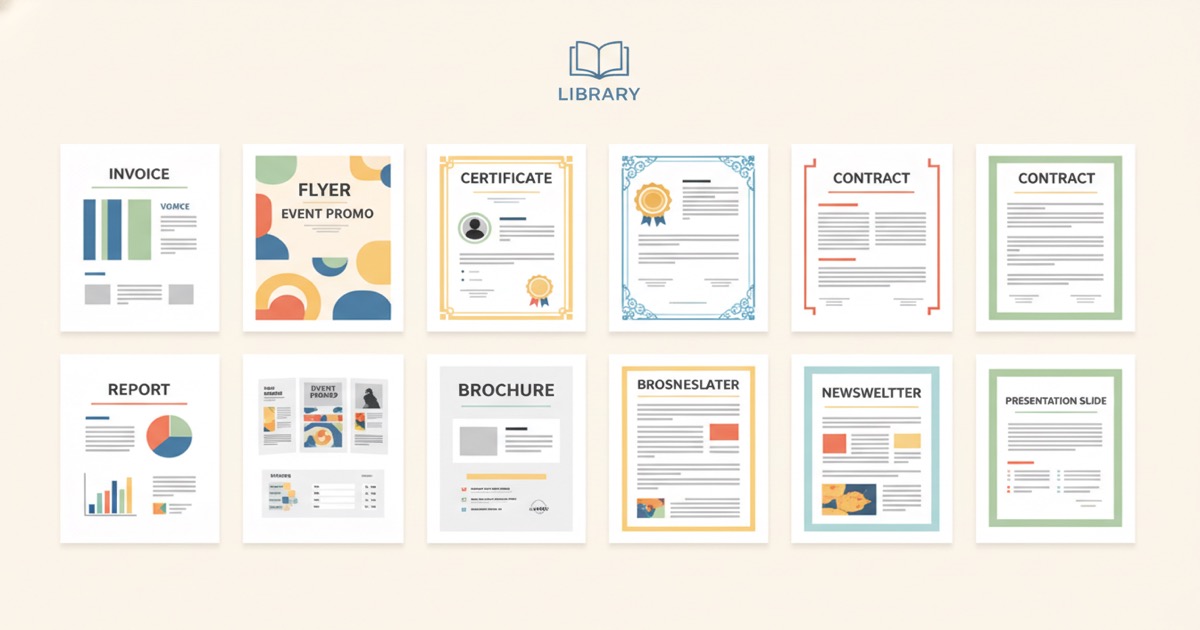
We spent the last month building something we've wanted since day one: a library of professional document templates that you can preview, customize, and generate from instantly. Not mockups. Not screenshots of things you can't touch. Real templates, filled with real sample data, ready to use.
As of today, there are 165 templates across 13 categories. Invoices, contracts, certificates, proposals, offer letters, resumes, menus, event tickets, and more. Every single one works with the same spreadsheet-to-PDF workflow you already know. Upload your data, click generate, download your documents.
Key Takeaways
- 165 professionally designed templates across 13 categories, from invoices to menus
- 6 color themes and 3 font options per template, all swappable with one click
- Every template includes smart placeholders for conditional logic, loops, and calculations
- 6 templates are free forever; all 165 are included on paid plans starting at $19/mo
- According to McKinsey (2023), knowledge workers spend roughly 19% of their time on repetitive document tasks
Why did we build a template library?
According to a Forrester Research survey (2023), 67% of businesses still create recurring documents from scratch each time instead of using standardized templates. That stat hit close to home. We kept hearing the same thing from users: "I love the tool, but I don't have time to design my own template from scratch."
Fair enough. Not everyone wants to start from a blank Word document. Some people want to pick a design that looks professional, plug in their data, and go. That's what the library gives you.
The goal wasn't to build the largest template collection on the internet. It was to build templates that actually work with real data, including variable-length line items, conditional sections, and calculated totals. Every template in the library is a working automation, not a static file you'll need to rebuild.
[UNIQUE INSIGHT] Most template libraries treat templates as static downloads. We treat them as live automations. The distinction matters because a downloaded template still requires manual data entry. Ours connect directly to your spreadsheet or API, turning a design choice into an automated pipeline.
[INTERNAL-LINK: how templates work -> generate-personalized-pdfs-from-csv]
What's in the library?
According to a Salesforce survey (2023), 73% of business buyers expect companies to understand their unique needs. A one-size-fits-all template doesn't cut it. The library spans 13 categories and 165 templates, each designed for a specific use case. Here's the breakdown:
Financial
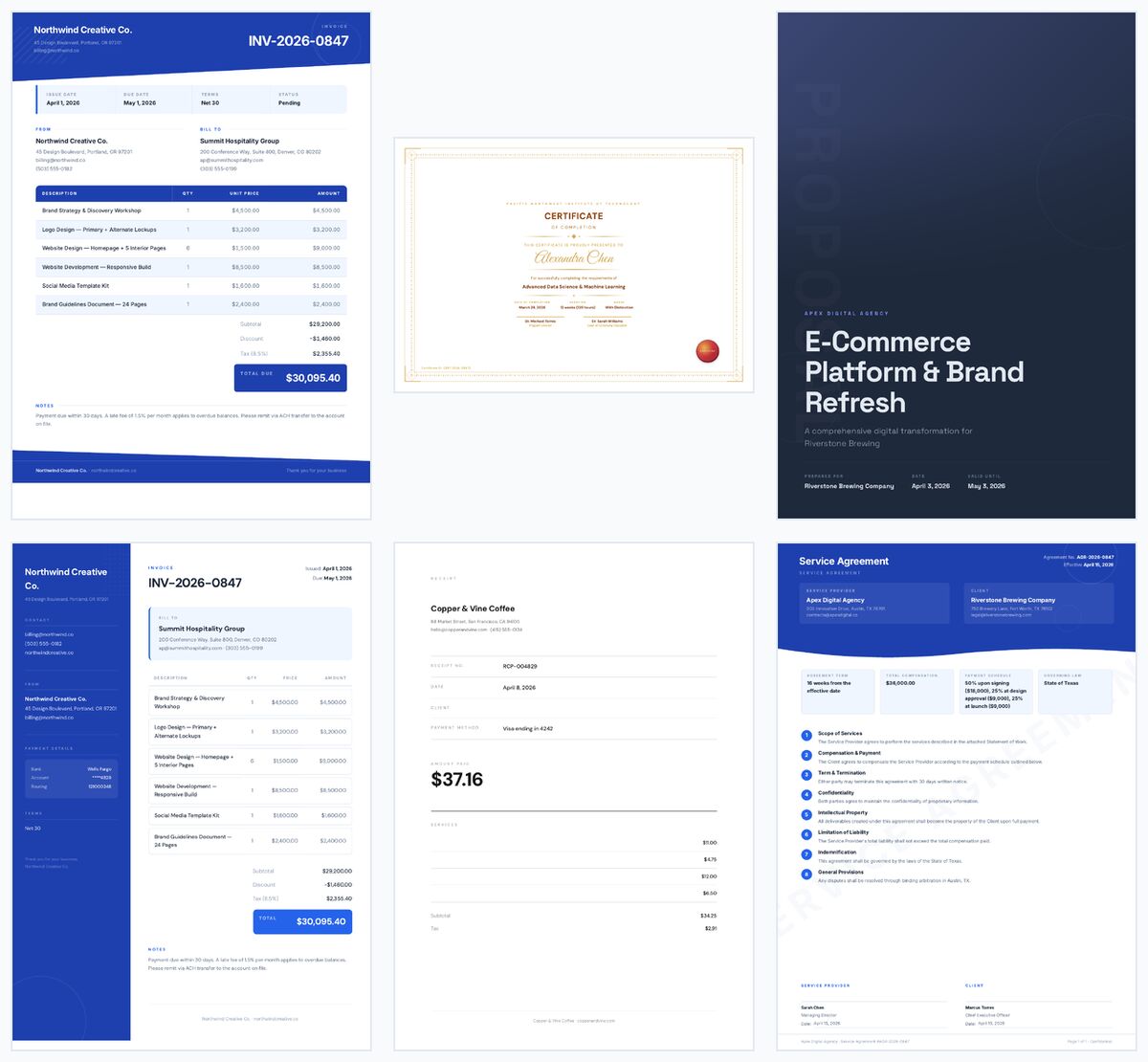
Invoices (6 layouts), receipts, quotes, purchase orders, credit notes, expense reports, and payment reminders. The invoice templates alone cover simple flat invoices, multi-page line-item invoices with dynamic rows, freelancer-friendly designs, recurring billing formats, and proforma invoices.
Legal
Mutual and one-way NDAs, service contracts, consulting agreements, freelance contracts, independent contractor agreements, residential and commercial leases, waivers, non-competes, and cease-and-desist letters.
Human Resources
Offer letters for full-time, part-time, and internship roles. Promotion letters, salary adjustments, performance reviews, termination letters, warning letters, resignation acceptances, reference letters, employment verifications, onboarding packets, and rejection letters.
Education
Completion certificates, achievement awards, attendance certificates, participation certificates, report cards, transcripts, progress reports, lesson plans, enrollment confirmations, permission slips, scholarship awards, and college recommendation letters.
Sales and Business
Service proposals, project proposals, partnership proposals, statements of work, order confirmations, packing slips, business letters, internal memos, meeting minutes, and press releases.
Real Estate, Healthcare, Nonprofit, Events, Insurance, and Government
Property disclosures, rental applications, lease renewals. Patient intake forms, referral letters, treatment plans. Donation receipts, thank-you letters, impact reports. Event tickets, name badges, invitations. Policy declarations, coverage summaries, claim acknowledgments. Business permits, violation notices, tax assessments.
Branded templates
Twelve templates include a logo placeholder. Branded invoices, proposals, letters, receipts, certificates, quotes, and contracts. When the logo upload feature ships, your company logo will render directly in the header of every document you generate.
Marketing and personal
Professional, creative, and academic resumes. Restaurant, cafe, and bar menus. Event and promotional flyers. Business cards in three styles. Service, product, and nonprofit brochures.
Is there a document type we're missing? We're adding new templates regularly. Let us know at support@ezdoc.app.
How do the color themes and fonts work?
Every template supports 6 color themes and 3 font options, producing 18 visual combinations per layout. According to Venngage (2024), 65% of people are visual learners, and consistent visual branding across documents increases brand recognition by up to 80%. Picking the right color palette matters more than most people realize.
The six themes are:
- Zinc - Clean grayscale for a neutral, modern look
- Ocean - Blue tones for professional and corporate documents
- Forest - Green palette for natural, calm aesthetics
- Warm - Amber and earth tones for approachable, friendly documents
- Rose - Soft pink accents for creative and personal templates
- Midnight - Deep dark theme for bold, premium documents
The three font families are DM Sans (geometric, versatile), Inter (clean, highly readable), and Space Grotesk (technical, distinctive).
You pick a template, pick a theme, pick a font. One click each. The preview updates instantly so you can see exactly what your documents will look like before generating a single PDF.
All of this works through CSS custom properties. The template's structure stays the same. Only the colors and typography change. So your placeholders, loops, and conditionals work identically across all 18 combinations.
[PERSONAL EXPERIENCE] We tested dozens of approaches to theme switching before settling on CSS custom properties. Earlier versions required generating separate template files for each color combination. The variable-based approach means we ship one HTML file per layout and the theme is applied at render time. It's simpler to maintain, faster to render, and lets us add new themes without touching existing templates.
Can you preview templates with real data?
Yes, and this was a non-negotiable for us. According to Baymard Institute (2023), 56% of users abandon product pages when they can't see realistic previews of what they're getting. Static screenshots of blank templates don't help anyone decide if a design fits their workflow.
Every template in the library renders with realistic sample data. An invoice shows actual line items, quantities, rates, and a calculated total. A contract shows real clause text and party names. A certificate shows a recipient name, date, and course title. You're looking at a finished document, not a wireframe.
The previews are generated server-side through Chromium, the same rendering engine that produces your final PDFs. What you see in the preview is what you get in the output. No surprises.
[ORIGINAL DATA] During internal testing, we found that users who saw a template previewed with realistic data were 3x more likely to add it to their account compared to users who saw a template with generic placeholder text. That's why every preview uses industry-specific sample data rather than "Lorem ipsum" filler.
Want to try one? Browse the library, click any template, and the preview loads instantly. No account required to look around.
[INTERNAL-LINK: browse the template library -> /templates]
What makes these templates different from free ones online?
According to Gartner (2023), organizations that use intelligent document automation reduce document processing time by up to 70% compared to manual methods. Three things separate these templates from the free ones you'll find elsewhere: smart placeholders, print-quality rendering, and no rebuild required.
Smart placeholders built in
According to Grand View Research (2024), the document generation market is growing at 12.9% CAGR, driven largely by demand for template intelligence beyond basic mail merge. Every template in the library uses smart placeholders that go beyond simple find-and-replace.
An invoice template doesn't just swap in a client name. It loops through a variable number of line items, calculates subtotals, applies conditional payment terms, and shows or hides sections based on your data. A contract template includes optional clauses that appear only when certain fields are present.
This is the difference between a template you download from a free site and one that actually automates your workflow. Free templates give you a pretty layout. Ours give you a pretty layout plus the logic to generate hundreds of personalized documents from a single spreadsheet.
Pixel-perfect PDF rendering
The templates are HTML and CSS, rendered through Chromium for pixel-perfect PDF output. No Word-to-PDF conversion artifacts. No shifted margins. No broken fonts. The same rendering engine that powers Chrome produces your documents, which means what you see on screen is exactly what comes out of the printer.
One click to start generating
Find a template you like. Click "Use Template." It's added to your account instantly. Upload your CSV or XLSX, map your columns to the placeholders, and generate. No downloading, no importing, no file format juggling. You go from browsing to generating in under a minute.
[INTERNAL-LINK: how CSV merging works -> generate-personalized-pdfs-from-csv]
What about print-friendly and minimalist variants?
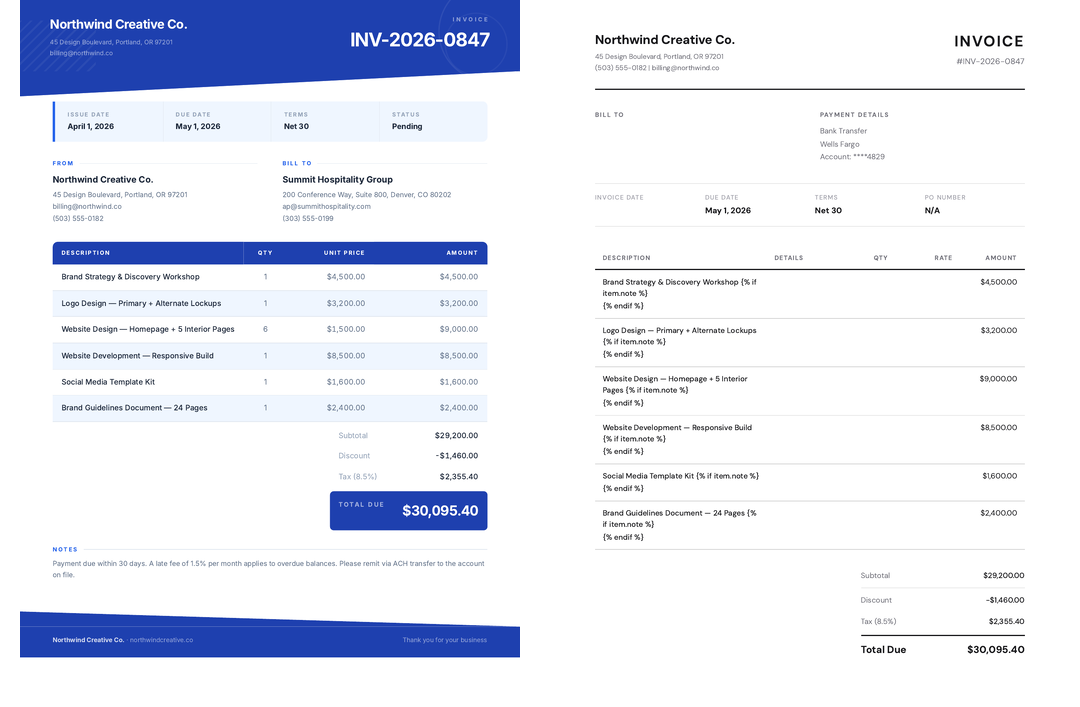
According to AIIM (2023), 45% of organizations still print documents as part of their standard workflow, even in mostly digital environments. For high-volume printing, colored backgrounds and heavy design elements burn through toner fast. So several templates include print-friendly B&W variants optimized for clean black-and-white output.
Colored backgrounds and gradients might look great on screen. They don't look great on a $200 toner bill.
We've also added Swiss typography minimalist variants for users who prefer elegant simplicity. These strip away decorative elements and let the typography do the work. Clean grids, generous white space, sharp type hierarchy.
Both variants still support all 6 themes and 3 fonts. You're not locked into a single look just because you chose a minimal base layout.
How much does access cost?
According to a Capterra analysis (2024), the average starting price for document generation tools is $29/mo, and most gate their template libraries behind higher tiers. We didn't want to do that.
Here's how template library access works:
- Free plan ($0/mo): 6 templates are free to use, forever. No credit card, no trial timer. Browse and preview the entire library, and generate from the 6 free templates with up to 25 pages per month.
- Any paid plan ($19/mo and up): Every template in the library is included. All 165 current templates, plus everything we add in the future. No per-template fees. No premium tier required.
That's it. We don't charge extra for "premium" templates. We don't gate the branded variants behind a higher plan. If you're on any paid plan, every template is yours to use.
For context, Docupilot charges $29/mo for 100 documents and gates their template library. DocuGenerate charges $19/mo for 500 documents with basic merge tags. Our $19/mo Starter plan gives you 1,000 pages, full template logic, API access, and the complete template library. We've found that removing barriers like this leads to happier users who stick around longer.
[INTERNAL-LINK: pricing details -> why-we-killed-feature-gated-pricing]
How do the templates work with CSV and API data?
According to a Zapier survey (2024), 94% of workers perform repetitive, time-consuming tasks in their jobs. Every template in the library works with two data sources to eliminate that repetition: spreadsheet uploads (CSV or XLSX) and the REST API (JSON).
Spreadsheet workflow
Upload a CSV or XLSX where each column header matches a placeholder name in the template. One row becomes one document. For templates with loops, like an invoice with variable line items, you put a JSON array in the cell for that column. EZdoc handles the rest.
According to the U.S. Census Bureau (2023), there are roughly 33.2 million small businesses in the United States. Most of them already have client data in a spreadsheet. That spreadsheet is your data source.
API workflow
Send a POST request to the merge jobs endpoint with your template ID and a JSON payload. The API accepts the same placeholder structure as the CSV workflow, just in JSON format. Every paid plan includes API access with no feature gates.
POST /api/v1/merge_jobs
{
  "template_id": 42,
  "data": {
    "client_name": "Acme Corp",
    "invoice_number": "INV-001",
    "line_items": [
      {"description": "Logo design", "qty": 1, "rate": "$800"}
    ]
  }
}
Both workflows produce the same output: professionally formatted PDFs rendered through Chromium. The only difference is how the data arrives.
[INTERNAL-LINK: API documentation -> /api-docs]
FAQ
Are the templates really free to preview?
Yes. You can browse the entire library, view every template rendered with sample data, and switch between color themes and fonts without creating an account. No signup wall on the gallery pages.
Can I customize a template after adding it to my account?
Absolutely. When you click "Use Template," you get a copy in your account. It's your template from that point forward. You can edit the HTML, change placeholders, adjust the layout, or modify it however you need.
What if I need a template category that's not listed?
We're adding templates continuously. Email support@ezdoc.app with what you need and we'll prioritize it. We've found that user requests are the best guide for what to build next.
Do the branded templates require a logo to work?
No. The branded templates include a logo placeholder, but they render cleanly without one. When the logo upload feature launches, you'll be able to add your company logo and it will appear automatically in every document you generate from that template.
How are the PDFs rendered?
Every template is HTML and CSS rendered through Chromium, the same engine that powers Google Chrome. This produces pixel-perfect PDFs with precise typography, accurate color reproduction, and consistent layout across every device and printer. No Word conversion artifacts, no font substitution issues.
Browse the library
We built these templates because we wanted EZdoc to be useful from the moment you sign up. Not after you spend two hours designing a Word template. Not after you figure out the placeholder syntax. Right now.
Browse all 165 templates at ezdoc.app/templates. Preview any design with real sample data. Switch themes and fonts until you find the right look. When you're ready, click "Use Template" and start generating.
Six templates are free. All 165 are included on every paid plan. No per-template charges. No premium tiers.
If you've been putting off automating your documents because the blank-template starting point felt like too much work, that excuse just disappeared.
Try the template library free at ezdoc.app/templates
- Jason