How to Connect Google Sheets to PandaDoc (and Why You Might Not Need To)
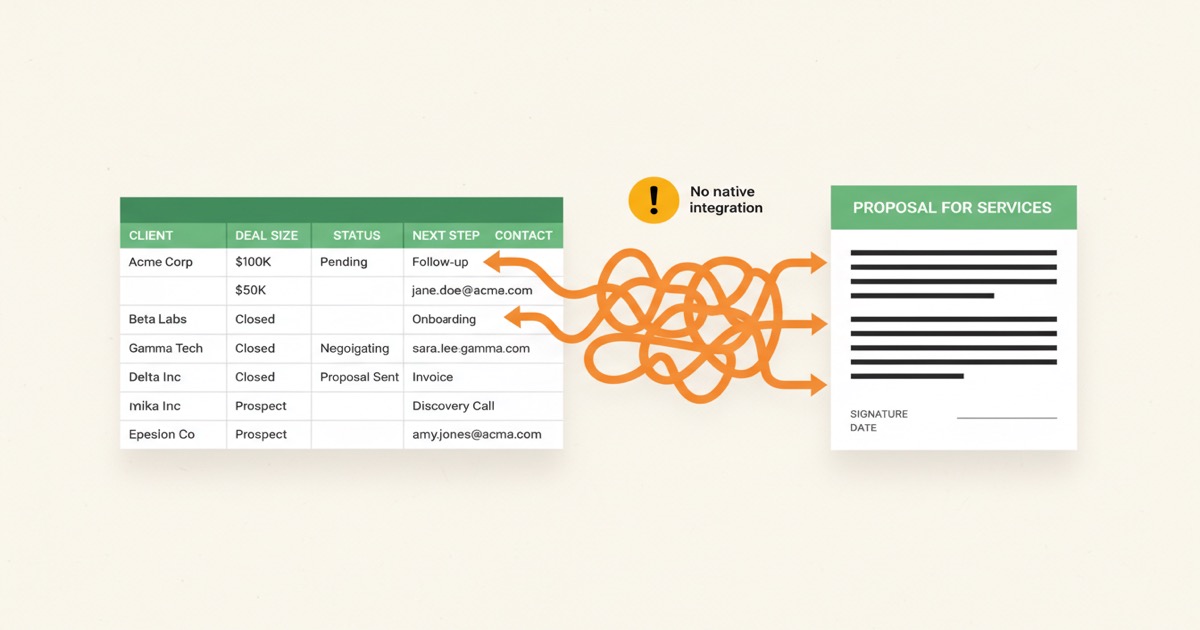
PandaDoc has no native Google Sheets integration. Compare its current Zapier and API paths with direct spreadsheet bulk generation in EZdoc.
How to Connect Google Sheets to PandaDoc (and Why You Might Not Need To)
Last updated August 2026.
You've got a sheet of 200 prospects, deals, or renewals. Each one needs a personalized proposal — the AI proposal generator turns one description into the finished document. PandaDoc handles your contracts, so the obvious next step is to push the rows from Google Sheets into PandaDoc and let the templates do the work.
Then you go looking for the integration. There isn't one. Not natively. PandaDoc's own integrations page for Google Sheets is titled "PandaDoc for Google Sheets via Zapier Integration." That's the official answer: use Zapier.
This post walks through the two real workarounds, the current plan and workflow questions to check, the configuration footguns that bite teams in week one, and the case for doing this another way entirely if your use case is bulk personalization from spreadsheet data.
Key Takeaways
- PandaDoc has no native Google Sheets integration. The official path is Zapier
- PandaDoc's official Google Sheets path is Zapier; check its current plan and usage-credit terms before building
- PandaDoc also offers a separate API pricing model for teams that need a custom integration
- If your only use case is "spreadsheet rows → personalized PDFs," EZdoc provides a direct paid Google Sheets connection; Free can test the same workflow with CSV batches
Photo by Carlos Muza on Unsplash

Does PandaDoc Have a Native Google Sheets Integration?
No. And PandaDoc is upfront about it. The official "Google Sheets" listing on pandadoc.com is titled "PandaDoc for Google Sheets via Zapier Integration," and the page lead reads: "Combine the power of Google Sheets documents and PandaDoc with this Zapier integration." (PandaDoc Google Sheets integration page, 2026)
There's no first-party connector. No sidebar widget like the HubSpot integration ships. No "Import from Google Sheets" button inside the document creation flow. If you want spreadsheet rows to flow into PandaDoc, you have two options: Zapier, or the PandaDoc API.
There's a third thing that looks like a fourth option but isn't. PandaDoc has a separate product called "PandaDoc for Google Docs," which lets you send an existing Google Doc through PandaDoc for signature. That's Google Docs, singular, the word processor. It does not pull data from Google Sheets. The naming similarity has caused enough confusion that it's worth saying out loud.
There's also a "Build a Webhook Integration with Google Sheets" tutorial buried in PandaDoc's developer docs. That one runs the opposite direction: PandaDoc events get written into a Sheet for reporting. Useful for ops dashboards. Useless for "create a proposal from this row."
PandaDoc's own community has been asking for native Sheets support since 2020. The official answer is still "use Zapier." On the long-standing UserVoice feature request titled "Pull values from Google sheet rows to PandaDoc", PandaDoc admins have repeatedly routed users to Zapier as the supported path, and a user, Sebastian Vibe-Petersen, confirmed in October 2022: "You can achieve this using Zapier. That's what I did :)". Six years and the answer hasn't changed.
How Do You Connect Google Sheets to PandaDoc Through Zapier?
You build a two-step Zap. The trigger watches a Google Sheet for new rows. The action creates a document in PandaDoc from a template, mapping the sheet's columns into the template's tokens.
Here's the exact configuration most teams land on:
- Trigger app: Google Sheets
- Trigger event: "New Spreadsheet Row" (fires on row append) or "New or Updated Spreadsheet Row" (fires on any cell change in an existing row)
- Action app: PandaDoc
- Action event: "Create Document from Template"
- Template: pick from your PandaDoc template library
- Field mapping: map each spreadsheet column to a PandaDoc token (Client.Name, Deal.Amount, etc.)
PandaDoc's Zapier connector also exposes Create Attachment, Create or Update Contact, and Send Document actions, which let you build a longer Zap that creates a doc, attaches a PDF, syncs the contact, and sends it for signature in one chain. That's a 4-step Zap, so check the current plan and usage-credit terms before rolling it out.

Photo by Lukas on Pexels
The polling delay nobody mentions in the demo
Zapier's free plan polls Google Sheets every 15 minutes. That's the latency between a row appearing in your sheet and PandaDoc seeing it. For most workflows that's fine. For "we just won a deal, fire the contract right now," it's not.
Faster polling and more involved workflows require a paid Zapier plan. Professional is the tier to check when you need multiple actions or filter steps; none of these flows are instant because Zapier polls the underlying Google Sheets API.
The other Zapier tier gotcha
Zapier Free supports one trigger and one action, 100 tasks per month, and 15-minute polling. That can be enough to test a simple Sheets-to-PandaDoc flow. Once the workflow needs a Filter, multiple actions, or faster polling, review Zapier Professional's current limits before rolling it out. (Zapier pricing, 2026)
The footgun that ruins the first weekend
This one's not in PandaDoc's documentation. It's the most-common self-inflicted wound on this pattern.
If your Zap trigger is "New or Updated Spreadsheet Row," every cell edit fires the action. You fix a typo in row 47's email address, Zapier sees an update, and PandaDoc creates another draft document. You correct a deal amount, Zapier fires again. By Monday morning you've got 30 half-baked drafts in your PandaDoc account.
The fix is a Zapier Filter step between the trigger and the PandaDoc action. Add a column to your sheet called Status and require it to equal "Ready to send" before the Zap proceeds. Set the status manually when the row is finalized. Now edits don't trigger anything until you flip the switch. The other fix is using "New Spreadsheet Row" instead of "New or Updated," which fires only on row append.
A bonus pro tip if you're committing to this stack: match your spreadsheet column headers exactly to PandaDoc's token names. If your template uses [Client.Company], name the column Client.Company. Zapier's mapping interface then shows a 1:1 dropdown match instead of asking you to hunt through a list of fields for each token. It saves an hour the first time and prevents drift the next time someone edits the template.
How Does the PandaDoc API Path Work?
If you have a developer on the team, the API gives you tighter control than Zapier and avoids the polling lag. You write a script (cron job, Cloud Function, your own backend) that reads from Google Sheets and POSTs to PandaDoc's /documents endpoint.
The minimum payload looks like this:
{
  "name": "Proposal for Acme Corp",
  "template_uuid": "ustHNnVaPCD6MzuoNBbZ8L",
  "recipients": [
    {
      "email": "jane@acme.com",
      "first_name": "Jane",
      "last_name": "Roe",
      "role": "Signer"
    }
  ],
  "tokens": [
    { "name": "Client.Company", "value": "Acme Corp" },
    { "name": "Deal.Amount", "value": "$12,500" },
    { "name": "Proposal.Date", "value": "2026-05-07" }
  ]
}
POST that to https://api.pandadoc.com/public/v1/documents with an Authorization: API-Key {your_key} header (or an OAuth bearer token if you're building a multi-tenant app). PandaDoc returns the document ID immediately and queues the actual creation in the background. (PandaDoc API documentation, 2026)
There are two API footguns worth flagging before you ship anything:
1. Document creation is asynchronous. The 201 response means PandaDoc accepted the request, not that the document is ready. The new document sits in document.uploaded status while PandaDoc renders it. You have to poll GET /documents/{id} until it reaches document.draft before you can call /send. If you call /send too early, you get an error. Most teams add a 2-3 second wait + retry loop and learn this lesson once.
2. Token names must match exactly. The name field of each token in your payload has to match a bracketed variable in your template, character-for-character, case-sensitive. [client.company] is not the same as [Client.Company]. If you're seeing fields render blank, the cause is almost always a typo or capitalization drift between your Sheet's column headers and the template's variable names. Open the template in PandaDoc's editor, click on the variable, and copy the exact string.
Choose the right PandaDoc model before you build
PandaDoc's standard plans and its API plans are separate product models. The standard pricing page describes the document-workflow tiers, while PandaDoc's API pricing describes API-specific access and usage. Its Zapier help currently lists the integration for Business and Enterprise and notes that each generated document uses a usage credit. Confirm the current plan, usage-credit, and API terms with PandaDoc before committing an operational workflow. (PandaDoc Pricing, PandaDoc API, PandaDoc Zapier help)

Photo by Lukas on Pexels
What Should You Price Before Choosing a Workflow?
Avoid fixed cost arithmetic in a workflow that depends on changing plan terms, seats, Zapier tasks, and document usage credits. Price the current PandaDoc standard or API model you need, then the Zapier plan and expected generated-document usage. The important operational difference is simpler: PandaDoc is built for a broader document workflow; EZdoc is built for direct, repeatable spreadsheet personalization.
Generate Personalized PDFs Directly From Google Sheets With EZdoc
The Zapier-and-API workaround is fine if you're sending a handful of proposals a month and the eSignature flow is the actual product. PandaDoc's signing ceremony, redlining, and audit trail are genuinely good. If you need those, the cost math works.
It breaks when your use case is "I have 200 rows and I need a personalized PDF for each one." That's not a proposal workflow. It's a bulk personalization workflow wearing a proposal workflow's hat. Needing a separate automation and document-workflow stack for a straightforward batch is the symptom.
That's what EZdoc's native Google Sheets integration was built for. Side by side:
| PandaDoc + Sheets (via Zapier) | EZdoc + Sheets (native) | |
|---|---|---|
| How | Sheets → Zapier → PandaDoc | Sheets → EZdoc, no middleman |
| Trigger latency | 15 min (Zapier Free), 2 min (Pro) | Instant (you click Generate) |
| Plan model | Current Business/Enterprise Zapier availability; separate API plans | Google Sheets on paid plans; CSV batch testing on Free |
| Workflow scope | Documents plus approvals, payments, redlining, contracts, and signatures | Spreadsheet rows to personalized documents and fillable e-signature collection |
| Volume pricing | Check current seats, tasks, and usage credits | Check the current EZdoc plan page |
| Setup time | 30+ min Zap config + Filter step debugging | 30 sec OAuth + pick a sheet |
Five clicks to generate 200 personalized PDFs from a Google Sheet:
- Connect Google Sheets via OAuth (one-time, ~30 seconds)
- Pick the spreadsheet + tab you want to merge from
- Pick a template (Corporate, Creative, or Invoice line-items)
- Hit Generate
- PDFs land where you want them — Drive folder, ZIP download, or emailed per row via the optional
_email_tocolumn
That's the entire workflow. No Zapier filter step to prevent the "every cell edit retriggers the Zap" bug. No async-API polling code. No separate automation layer for a straightforward batch.
If you want the visual demo, the native Google Sheets integration walkthrough shows it end-to-end, and the CSV-to-1,000-documents tutorial walks through what 1,000 personalized PDFs in one batch looks like.
Be Clear About Workflow Scope
EZdoc supports fillable e-signature collection for documents that need a signed response. PandaDoc remains the broader choice when the work also requires approval routing, payment collection, redlining, or a full contract workflow.
Use PandaDoc's broader workflow if you need approvals, payment collection, redlining, or contract management.
Use EZdoc if you need spreadsheet rows turned into personalized PDFs at any volume.
Many teams run both. PandaDoc can handle the contracts that need its broader workflow; EZdoc can handle renewals, monthly invoices, account-review packets, and quarterly business reviews, including fillable e-signature collection when a signed response is needed. We covered the broader stack pattern in the PandaDoc + HubSpot integration breakdown and the integrations launch post.

Photo by Lukas on Pexels
Try the Batch Workflow First
Native Google Sheets connection is available on paid EZdoc plans. The Free tier cannot connect a live Sheet, but it can test the same merge flow with a CSV batch before you choose a plan.
Explore Google Sheets and CSV batch generation →
Already have a sheet ready to go? Skip straight to Bulk Generate. If you want the side-by-side first, the EZdoc vs PandaDoc comparison breaks down feature, pricing, and use-case differences in a single table.
FAQ
Does PandaDoc have a native Google Sheets integration?
No. PandaDoc's official integration page for Google Sheets is titled "PandaDoc for Google Sheets via Zapier Integration" and explicitly directs users to Zapier as the supported path. (PandaDoc Google Sheets integration page, 2026) The community feature request asking for native Sheets support has been open since 2020, and the most recent admin response still routes users to Zapier.
What's the cheapest way to push Google Sheets rows into PandaDoc?
PandaDoc's official Google Sheets path is Zapier. Check PandaDoc's current Zapier availability, usage-credit terms, and Zapier's current task limits for the workflow you intend to run; those details change more often than a durable integration design.
Can I use the PandaDoc API to import from Google Sheets?
Yes. PandaDoc offers a separate API pricing model; check its current API plans before building. You'd write a script that reads from the Sheets API and POSTs to https://api.pandadoc.com/public/v1/documents. Two things to watch: document creation is asynchronous (you have to poll until status is document.draft before sending), and token names must match the template's bracketed variables exactly, case-sensitive.
Why is my Zap creating a new PandaDoc document every time I edit a row?
You're using the "New or Updated Spreadsheet Row" trigger, which fires on every cell change. Switch to "New Spreadsheet Row" to fire only on row append, OR add a Zapier Filter step that requires a Status = "Ready to send" column to be true. The Filter approach is more robust because you control exactly when a row is treated as final.
What's a faster way to bulk-generate documents from a Google Sheet?
EZdoc connects natively to Google Sheets on paid plans: pick a sheet, pick a template, and bulk-generate one personalized PDF per row. On Free, upload a CSV to test the batch flow before deciding. EZdoc can collect fillable e-signatures; choose PandaDoc when you need the broader approval, payment, redlining, or contract workflow.
— Jason