Make a Baby Shower Website with RSVP in Minutes
Describe the shower and EZdoc builds a lovely, mobile-friendly event page — date, details, schedule, registry, and one-tap RSVP — that you share with a link.
Coffee Co.
See a Baby Shower Website in action
One prompt in, a polished fictional example — fully editable when you make your own.
From idea to download in three steps
Describe the baby shower — who it honors, the date, venue, and the vibe
AI builds a hosted baby shower website with the details, schedule, registry, and RSVP
Share the link with your guests and watch the replies come in
Everything you need, nothing in the way
Built for speed and polish — so the document is done before you would have finished formatting the first page.
A Page as Soft as the Day
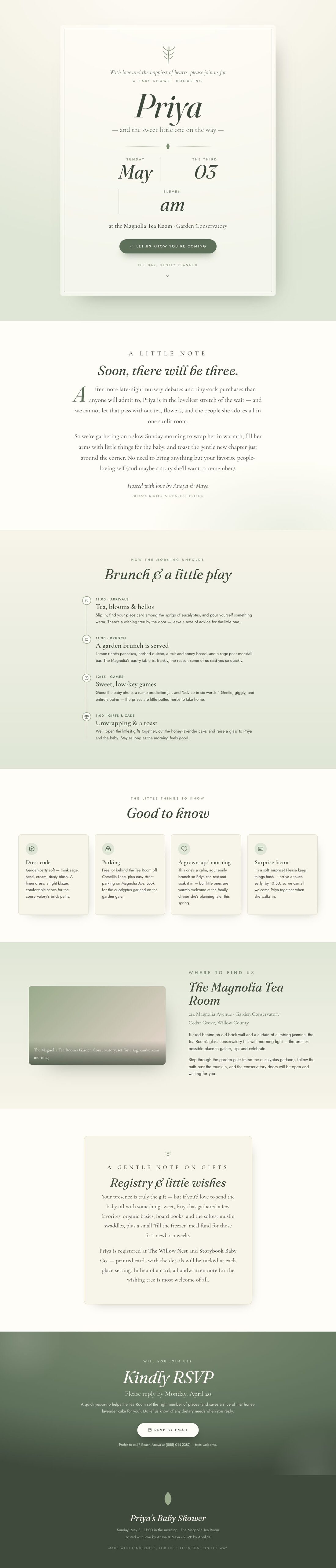
A calm sage-and-cream design like Priya's shower at the Magnolia Tea Room — gentle botanicals, warm type, and a hero that opens with the date, time, and the guest of honor's name.
Online RSVP, No Spreadsheet
Guests reply right from their phone with a tap. You see who's coming, plus a spot for dietary needs and plus-ones, so the venue can set the right number of places.
Schedule & Details Built In
Lay out how the morning unfolds — arrivals, brunch, gentle games, gifts and cake — alongside cards for parking, dress code, and the address with a map.
A Gentle Registry Note
Add a tasteful registry section with links to your stores or a meal fund, framed as a kind note rather than a hard ask — exactly how a shower should feel.
Share One Link, Anywhere
Your page is live on the web instantly. Drop the link in a group text, an email, or a paper insert via QR code — every guest sees the same up-to-date details.
Tweak with AI
Refine any result by chatting — "make it warmer", "add my logo top-right", "shorten the intro". The document updates in place.
Make a baby shower website guests will love
A baby shower website is a single, beautiful page you share with a link — far easier than mailing cards and chasing replies. It holds the invitation, the day's details, the registry, and an RSVP, all in one calm place guests can open from their phone. Think of Priya's shower at the Magnolia Tea Room: soft sage and cream, a sunlit garden brunch, and everyone in the loop without a single paper card.
Lead with the details
Open with the name of the parent-to-be, the date and time, and the venue, set against a gentle design that matches the mood. A quick line on the vibe — "a slow Sunday brunch" — tells guests what to expect and what to wear. Keep the hero uncluttered so the essentials land at a glance.
Show how the day unfolds
A short schedule sets the tone and keeps things moving:
- Arrivals — tea, hellos, and a wishing-tree note for the little one
- Brunch — the menu and any mocktail or coffee bar
- Games — light, opt-in, and giggly
- Gifts and cake — the toast and a soft close
Add cards for parking, dress code, and whether little ones are welcome — the small things that save a dozen texts.
Make the registry and RSVP easy
Frame the registry as a kind note: "your presence is the gift, but if you'd like to send something sweet…" with links to the stores or a meal fund. Then close with a clear RSVP and a deadline, plus a spot for dietary needs, so the venue can plan. With EZdoc you describe the shower, get a hosted page in minutes, and share one link that stays up to date for every guest.
Questions, answered plainly
How do guests RSVP on a baby shower website?
Guests open your page on any phone or laptop and reply with one tap — yes or no, number of guests, and a note for dietary needs. You see every response in one place, no spreadsheet or paper cards required.
Can I add the registry to the baby shower page?
Yes. There's a gentle registry section where you can link your stores — or a "fill the freezer" meal fund — framed as a kind note so guests can find it easily without it feeling like an ask.
Can I include the shower schedule and venue details?
Absolutely. You can lay out the morning — arrivals, brunch, games, gifts and cake — plus cards for the address, parking, dress code, and any "good to know" notes like a surprise arrival time.
Is the baby shower website free to make and share?
Yes, you can build and share your baby shower page for free. Describe the shower, get a polished hosted page in minutes, and send the link — no printing, no postage, no design skills needed.
Will the page look good on phones?
Yes. Every page is fully responsive, so the invitation, schedule, and RSVP look beautiful whether a guest opens it on a phone, tablet, or laptop — which is where most people will read it.
More like this
Explore All AI Tools
Every tool generates professional documents in 30 seconds. No design skills needed.
Advertising & Promo
Automation
Business & Finance
- Send a professional invoice in
- Create Business Proposals
- Create Professional Credit Notes
- Create Expense Reports
- Create Purchase Orders
- Create Professional Quotes
- Create Professional Receipts
- Build a Complete Business Plan
- Design Professional Letterhead
- Create Accurate Pay Stubs
- Create Professional Estimates
- Write Standard Operating Procedures
- A business proposal generator that helps you win the deal
- An investor-ready pitch deck from
- An investor update your backers actually read, from
- A board deck that runs the meeting, from
- An SOP generator that
- Create a credit note in
- The AI presentation maker that designs your deck from
Certificates & Awards
Contracts & Legal
Data
HR & Employment
- Create a Stunning Resume
- Write a Compelling Cover Letter
- Create Professional Offer Letters
- Create Promotion Letters
- Write a Letter of Recommendation
- Create Employee Reward Letters
- Create Termination Letters
- Create Employee Warning Letters
- Write a Professional Resignation Letter
- Build a Complete Employee Handbook
- The best AI resume builder is the one that gets you hired
Healthcare & Education
Letters & Communications
Marketing & Events
- Create an Explainer Video
- Generate a Printable Tournament Bracket
- Generate a Printable Lineup Card
- Generate a Printable Trivia Answer Sheet
- Generate a Printable Ballot
- Generate a Printable Pledge Card
- A Dignified Funeral Program, Ready When You Need It
- Design Eye-Catching Flyers
- Design a Restaurant Menu That Looks Like You Hired a Studio
- Design Professional Brochures
- Design Event Tickets
- Design Beautiful Invitations
- Design Professional Name Badges
- Design Eye-Catching Posters
- Create Engaging Newsletters
- Design Beautiful Gift Certificates
- Design Professional ID Cards
- Turn Beehiiv Posts into a Lead Magnet
Marketing & Personal
Marketing & Sales
Reports & Documents
Resumes & Careers
Social media
Automation & API
Browse all 388 industry & vertical variants
Job Application Form Types
Payment Authorization Form Types
Permission Slip Form Types
Order Form Types
Rental Application Form Types
Consent Form Types
Waiver Form Types
Survey Form Types
Intake Form Types
Nda Form Types
Generic Types
Invoice Types
Credit Note Types
Contract Types
Proposal Types
Certificate Types
Report Card Types
Poster Types
Invitation Types
Business Plan Types
Recommendation Letter Types
Explainer Animation Types
Tournament Bracket Types
Book Report Types
Lineup Card Types
Answer Sheet Types
Ballot Types
Resume Types
Cover Letter Types
Menu Types
Brochure Types
Business Card Types
Bill Of Sale Types
Inspection Checklist Form Types
Request Form Types
Evaluation Form Types
Service Agreement Form Types
Photo Release Form Types
Donation Form Types
Event Registration Form Types
Membership Form Types
Rsvp Form Types
Booking Form Types
Volunteer Application Form Types
Acknowledgment Form Types
Sign Up Sheet Types
Webpage Types
Pledge Card Types
Memorial Program Types
Make your first document in 30 seconds.
Free to try — no credit card, no template wall. Keep whatever you generate.
Start Creating Free